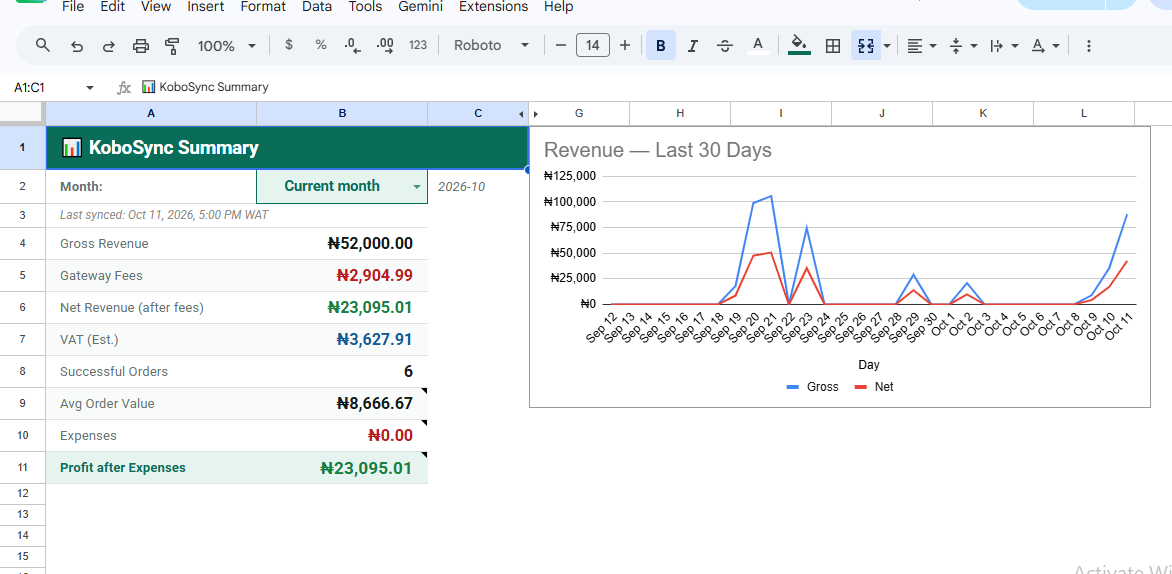
For almost every digital business in Nigeria, Google Sheets is the unofficial financial dashboard. It is flexible, highly customizable, and completely free. Whether you are tracking daily sales volumes, calculating marketing ROI, or sharing updates with your co-founders, spreadsheets are where your business operations live.
But as your store begins to scale, a major operational headache emerges: getting your transaction data into that spreadsheet. If your current process involves downloading CSV files from your Paystack or Flutterwave dashboards every weekend and manually copy-pasting rows into Google Sheets, you are running an inefficient setup. Manual uploads waste valuable execution time, lead to human error, and keep you from seeing your actual cash flow metrics in real-time.
Here is a step-by-step breakdown of how to turn your Google Sheets ledger into a real-time, automated financial command center.
1. The Core Problem: The Delayed CSV Trap
Most merchants run their financial audits reactively. They log into their payment gateway dashboards on Friday afternoons, export a CSV log of the week's transactions, and copy-paste it into a master Google Sheet. This approach creates two severe problems for your business:
- Blind Operations: You are navigating your business using historical data. If a specific marketing campaign runs out of budget or an inventory line sells out unexpectedly on Tuesday, you won't spot the trend in your tracking sheets until your weekend audit.
- The "Mismatched Totals" Nightmare: Payment gateways process millions of webhooks simultaneously. During network fluctuations or local bank downtime, duplicate data logs can occur. When your team uploads raw CSVs manually, they frequently overlook duplicate transaction rows, resulting in inflated revenue numbers that don't match your actual bank payouts.
2. Moving from Pulling Data to Pushing Events
To build a true, auto-updating financial backend, you need to change your data architecture. Instead of manually "pulling" files out of your gateway accounts once a week, you need to configure your gateways to "push" individual transaction events to your spreadsheets the exact second they happen.
This real-time automation loop relies on three structural elements:
- The Ingress Trigger: A customer inputs their card or initiates a bank transfer on your checkout page. The gateway processes the money successfully.
- The Webhook Payload: The gateway automatically packages the transaction details—such as the customer's email, gross amount, transaction reference, and platform processing fees—into a secure digital payload.
- The Spreadsheet Ingestion: A cloud router intercepts that payload, translates the code into a clean text string, and appends it as a brand-new row at the bottom of your Google Sheet instantly.
3. The 3-Point Checklist for a Robust Sheets Automation
While it is possible to build custom scripts using Google Apps Script to listen to gateway events, a reliable, production-ready ledger automation must feature three non-negotiable guardrails:
- Native Fee Extraction: Your automation must cleanly separate your gross transaction value from the platform's processing fee (e.g., Paystack’s 1.5% + ₦100 cap). If your script only logs the net payout amount, your revenue records will look completely inaccurate to an accountant.
- Idempotency & Deduplication Filters: Network dropouts happen daily. If a gateway sends a webhook payload twice due to a slight connection lag, your spreadsheet integration must feature an automated filter that drops the duplicate row based on its unique transaction reference.
- Multi-Currency Standardization: If your store processes checkouts in both Naira (NGN) and US Dollars (USD), your automation layer must isolate the currencies into separate tracking buckets or convert them using a stable parallel-rate tracker to protect your cash flow charts from inflation distortions.
Connect Your Gateways to Google Sheets in 2 Minutes
Stop wasting your weekends downloading CSV files and debugging broken spreadsheet rows. KoboSync acts as the secure, zero-code background automation bridge for your business. The exact millisecond a transaction clears on Paystack, Flutterwave, or Monnify, KoboSync processes the payload, parses the localized platform fees, and logs a clean, perfectly balanced row to your Google Sheet in under 3 seconds.
Final Thoughts: Letting Your Team Focus on Growth
Your spreadsheet shouldn't feel like an administrative chore—it should function as a real-time tracking dashboard that guides your daily business decisions. By automating your transaction streams directly into Google Sheets, you eliminate tedious data entry, eliminate human errors, and free up your team to focus on what actually matters: scaling your brand and increasing your margins.