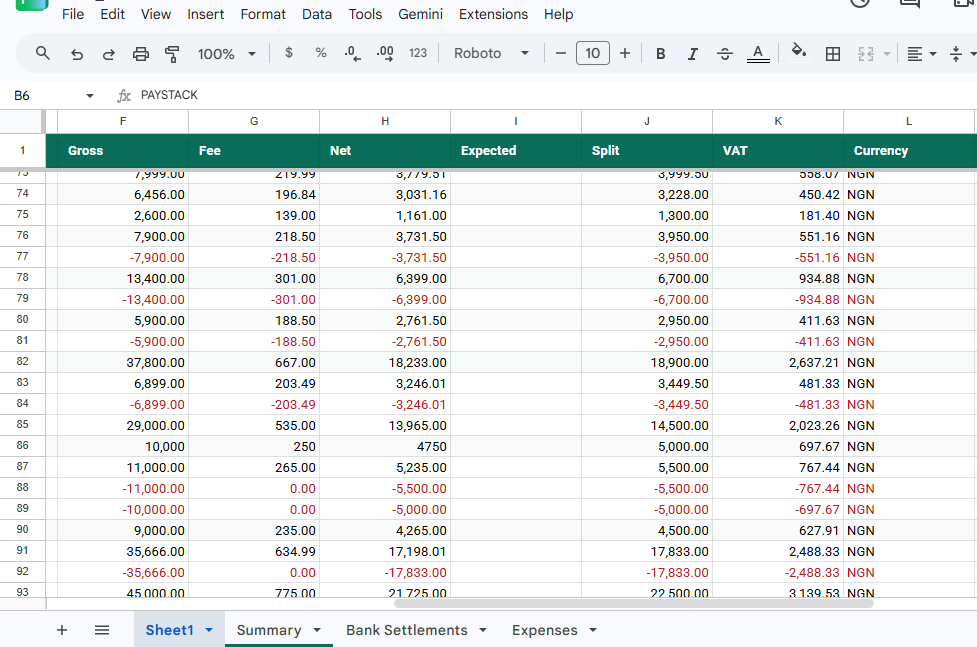
For e-commerce founders and financial directors, understanding the difference between what your customers pay and what actually lands in your bank account is critical[cite: 1]. Every time a customer completes a checkout via Paystack, Flutterwave, or Monnify, the payment provider deducts a platform processing fee before settling the remaining balance into your corporate account[cite: 1].
A common bookkeeping mistake among growing Nigerian businesses is recording only the net payout as total revenue, or conversely, treating gross revenue as net income without accounting for processing deductions[cite: 1]. Mismanaging these gateway fees distorts your financial statements, misleads your internal reporting, and complicates your end-of-year corporate income tax filings[cite: 1].
Here is how to properly separate gross sales volume from platform fees so your ledgers remain pristine and audit-ready[cite: 1].
1. The Gross vs. Net Accounting Trap
When reviewing a weekly payout report, many merchants look at the final cash transferred to their bank and log that exact figure as their business revenue[cite: 1]. This creates a severe blind spot:
- Understated Revenue: Your actual sales volume was higher, but the gateway's fee swallowed a portion before settlement[cite: 1].
- Unaccounted Operating Expenses: Payment gateway fees are legitimate operating expenses (similar to bank charges or POS rental fees) that can be written off against your taxable corporate income[cite: 1]. If you lump them together, you lose clear visibility into your true cost of sales[cite: 1].
Conversely, if you log your gross checkout total as your revenue without tracking the fees as an expense, your financial reports will show cash balances that never reconcile with your actual bank statements[cite: 1].
2. Standardizing Fee Structures Across Gateways
Different payment providers use unique charging formulas, making manual tracking complicated[cite: 1]:
- Card Transactions: Typically charged at a percentage plus a flat fee (e.g., Paystack’s standard local rate of 1.5% + a flat cap on high-value transactions)[cite: 1].
- Bank Transfers: Often structured with tiered flat fees or percentage caps depending on the transfer volume[cite: 1].
- International Cards: Charged at a significantly higher percentage rate to account for foreign exchange and cross-border clearing costs[cite: 1].
To keep your books accurate, every single transaction must be broken down into three distinct columns in your ledger: Gross Sales Amount, Gateway Processing Fee, and Net Settlement Value[cite: 1].
3. Building a Compliant Expense-Tracking Workflow
To ensure your end-of-year tax returns reflect your true net profits, your financial backend must handle fee deductions systematically:
- Itemized Logging: Every transaction payload must capture the exact fee charged by the gateway in real-time[cite: 1].
- Expense Categorization: Group gateway deductions under a dedicated "Payment Processing Fees" ledger account[cite: 1]. This allows your accountant to deduct these expenses legally when calculating company income tax[cite: 1].
- Reconciliation Transparency: Ensure your bank statement deposits match the sum of net settlements minus any payout transfer charges[cite: 1].
Automate Your Fee Tracking on Auto-Pilot
Manually calculating gateway percentages and separating fees from gross sales across multiple dashboards is a massive drain on your finance team[cite: 1]. KoboSync acts as your zero-code background automation layer[cite: 1]. The exact millisecond a transaction clears on Paystack, Flutterwave, or Monnify, KoboSync automatically extracts the platform fee, logs your gross revenue correctly, and records the processing deduction as an operating expense in your Google Sheets or accounting software in under 3 seconds[cite: 1].
Start Automating Your Ledgers Free →[cite: 1]
Final Thoughts: Protecting Your Profit Margins
Tracking merchant fees accurately isn't just about satisfying auditors—it gives you a clear, unvarnished look at your true unit economics[cite: 1]. By separating gateway deductions from your revenue, you ensure your tax filings are compliant, your profit margins are transparent, and your financial data is fully optimized for growth[cite: 1].